
What is SMB signing?
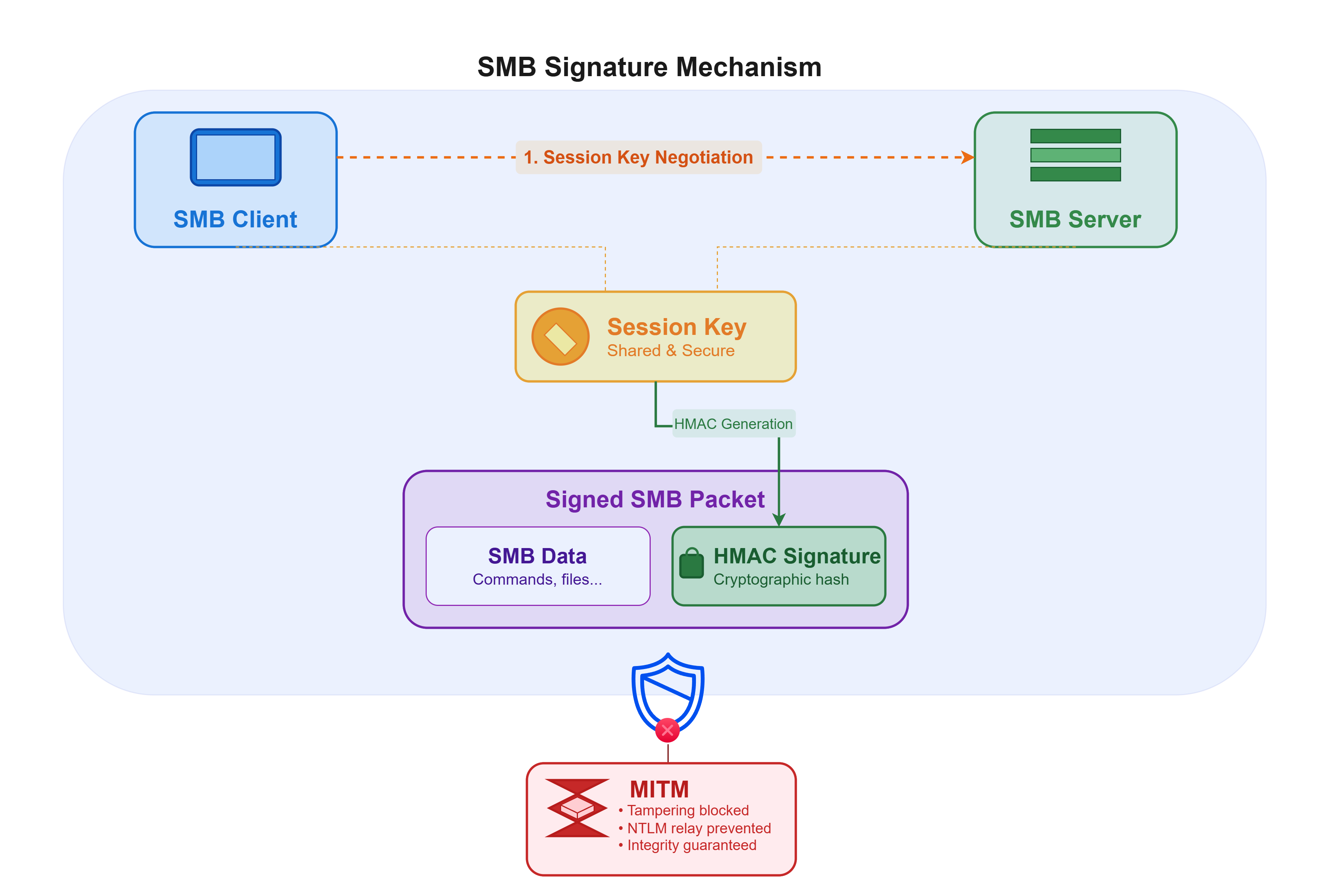
SMB signing is a cryptographic mechanism that ensures the integrity and authenticity of SMB exchanges between machines. Each packet is signed using an HMAC derived from a negotiated session key, and any modification invalidates the communication. It effectively prevents an attacker in a MITM (Man-in-the-Middle) position from tampering with SMB traffic or relaying authentication attempts to other services (NTLM relay).
Risks
The absence of SMB signing primarily exposes the infrastructure to Man-in-the-Middle attacks. An attacker present on the internal network can intercept SMB communications, modify them, or impersonate a legitimate service. In this context, it becomes possible to carry out NTLM relay attacks — capturing an NTLM authentication attempt issued by a machine or user and forwarding it in real time to another service (SMB, LDAP, HTTP, MSSQL, WinRM, etc.) to authenticate without ever knowing the password.
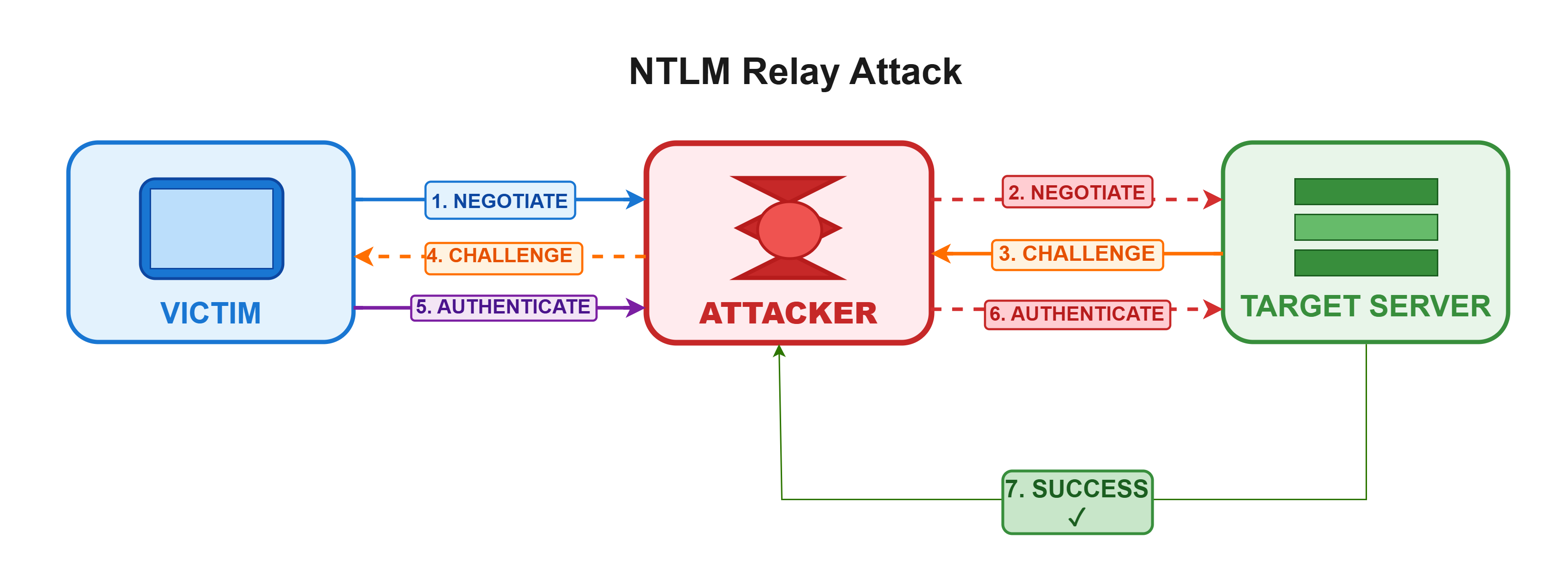
If the relayed account is privileged, the attacker can directly impersonate it and leverage its permissions on the target. This typically enables remote command execution, deployment of malicious services, access to administrative shares and, depending on the scope, compromise of one or more machines — or even the entire Active Directory domain.
If the relayed account does not hold elevated privileges, the immediate impact is often limited to read/write access. However, the presence of sensitive file shares, script repositories, or automated mechanisms (deployment scripts, GPOs, services) can enable indirect compromise. Moreover, the unpredictability of which accounts may authenticate makes this vector particularly critical in an Active Directory environment.
Remediation
It is therefore recommended to enable SMB signing to ensure the integrity and authenticity of SMB communications and to protect against Man-in-the-Middle and NTLM relay attacks.
To do so, configure the local security policy (or via a GPO) on the relevant workstations and servers by following these steps:
Open the Local Group Policy Editor:

Navigate to Computer Configuration → Windows Settings → Security Settings → Local Policies → Security Options:
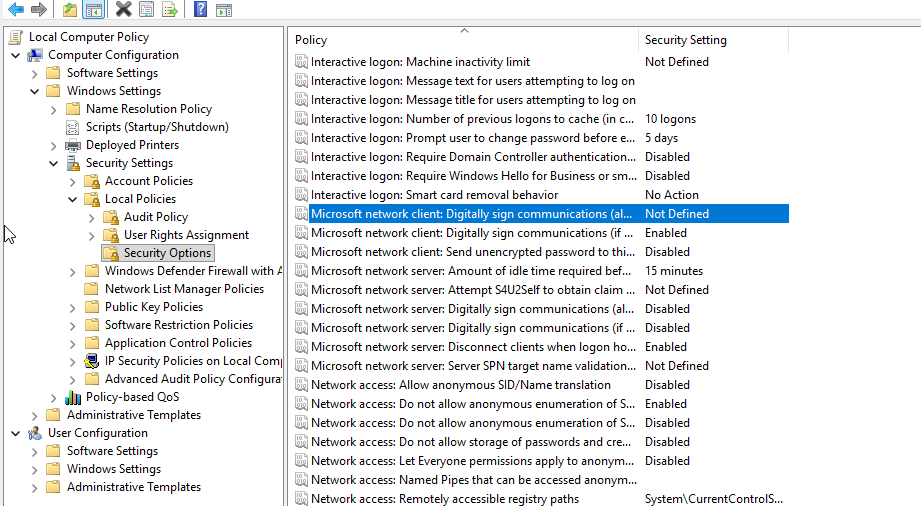
In this menu, two options are relevant:
- First, enable "Microsoft network client: Digitally sign communication (if server agrees)" before rolling out the policy across all workstations on the internal network. We recommend testing on a small group of machines first to verify that enabling SMB signing does not cause disruption. Indeed, SMB signing introduces heavy cryptographic computations to verify integrity, which can sometimes result in noticeable latency — particularly with SMBv1. However, this latency is far less perceptible with SMB versions 2 and 3.
- Once testing is complete, enable "Microsoft network client: Digitally sign communication (always)".
Additional information
When deploying SMB signing, make sure to monitor Event IDs 3021 and 3027 in the Microsoft-Windows-SMB Server/Security log. These events flag SMB clients that refuse or do not support signing, helping you detect and address security issues post-deployment.
SMB signing is an excellent "canary" for security maturity. An environment that can enforce SMB signing without incident is typically one that is up to date, has few legacy dependencies, and is ready for more advanced hardening measures (LDAP signing, NTLM deprecation, etc.).
To go further: read our Red Team article on NTLM relay exploitation techniques.
Need a security audit or tailored cybersecurity support?
Explore our services →