
What is IPv6 and why is it a risk?
IPv6 is the successor to IPv4, designed to address the exhaustion of available addresses. With a 128-bit address space (compared to 32 for IPv4), it offers a virtually unlimited number of addresses. On nearly all modern operating systems (Windows, Linux, macOS), IPv6 is enabled by default.
This is precisely where the problem lies: most network teams configure and monitor their infrastructure with IPv4 in mind, leaving IPv6 active but unmanaged. An active protocol that is neither filtered nor monitored is an attack surface.
Attack vectors related to IPv6 misconfiguration
Rogue Router Advertisement (RA Spoofing)
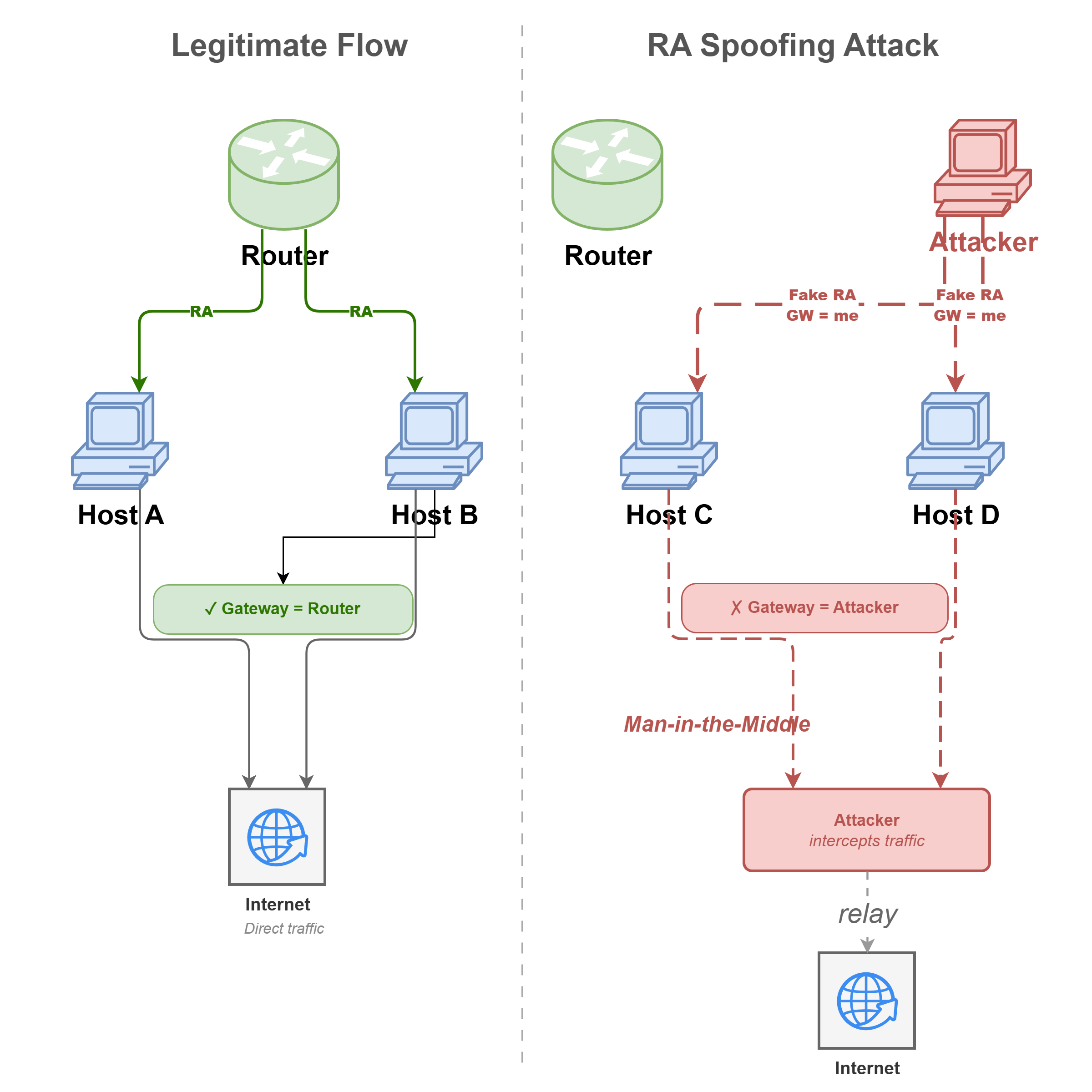
IPv6 relies on the NDP (Neighbor Discovery Protocol) for automatic address configuration (SLAAC). In this mechanism, routers broadcast Router Advertisements (RA) to tell hosts how to configure their address and default gateway.
An attacker present on the internal network can send rogue RAs and position themselves as the default gateway for the entire network segment, achieving a complete Man-in-the-Middle without requiring any special privileges.
DHCPv6 Rogue Server (via mitm6)
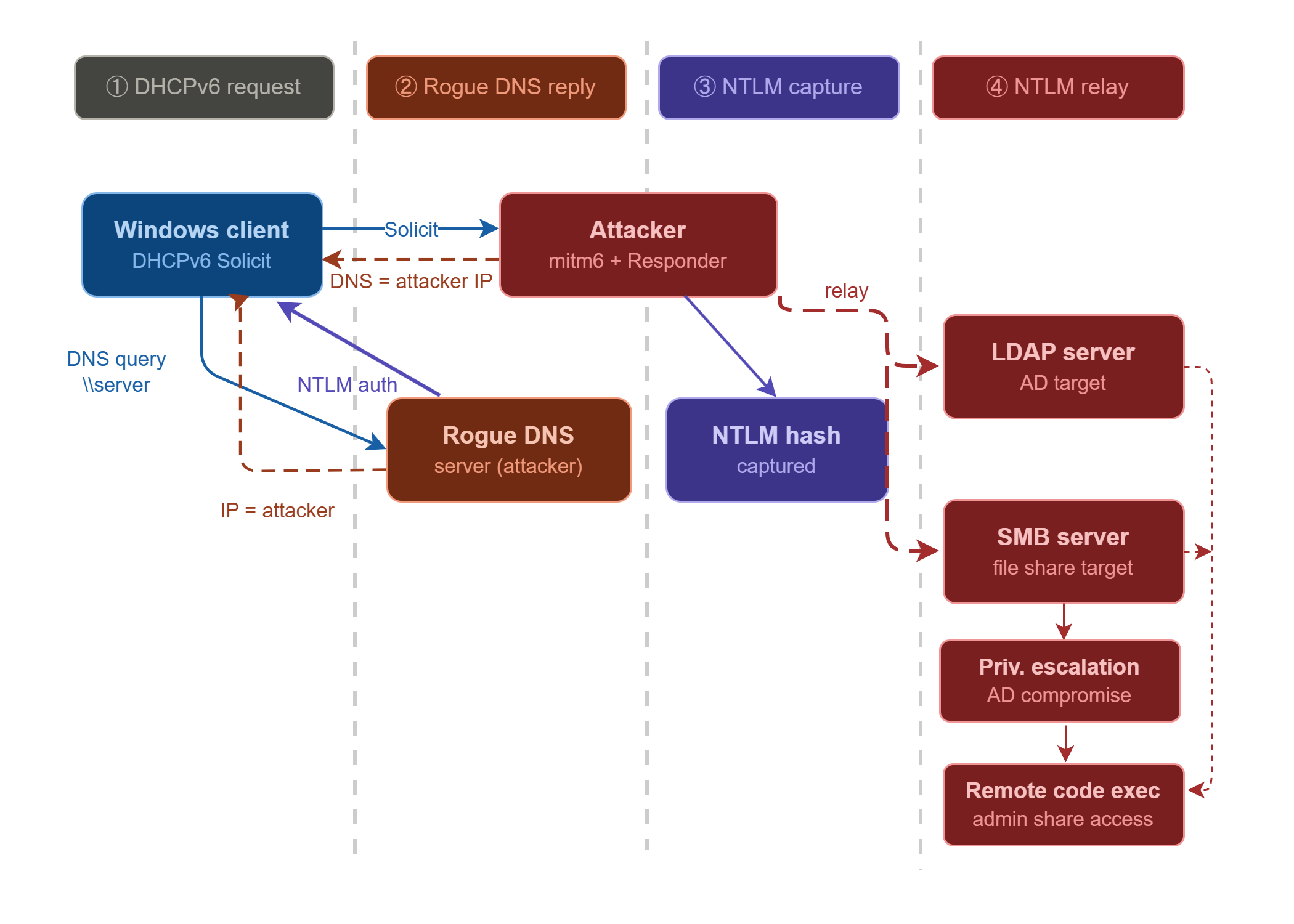
Even in environments that have not deployed DHCPv6, Windows periodically sends DHCPv6 requests if IPv6 is active. An attacker can respond to these requests with a rogue DHCPv6 server to provide a DNS address pointing to their machine and an arbitrary DNS search suffix.
As a result, all unqualified DNS resolutions (e.g. \\server) pass through the attacker's machine. Combined with NTLM relay (Responder, ntlmrelayx), this enables capture and relay of NTLM authentications on the Active Directory network, without any user interaction.
Missing IPv6 firewall rules
Modern firewalls generally handle both IPv4 and IPv6, but the risk appears as soon as an administrator hardens only IPv4 and omits IPv6 — which remains common in environments without an explicit IPv6 policy. In this case, since every host automatically has a link-local address (fe80::/10) as soon as an interface is active, a service blocked on IPv4 may remain accessible via IPv6 from the same network segment.
On Linux, iptables and ip6tables are historically two separate tools (although nftables now unifies both). On Windows, IPv4 and IPv6 rules must be explicitly verified. The blind spot is not systematic, but a single oversight is enough for a supposedly closed port to remain open via IPv6.
Concrete example: a server with port 445 (SMB) blocked on IPv4 may be reachable on that same port via its IPv6 link-local address (fe80::...) from any host on the same network segment.
Remediations
Disable IPv6 if not in use
If your infrastructure does not require IPv6, the simplest measure is to disable it.
# Disable IPv6 on all interfaces
Get-NetAdapterBinding -ComponentID ms_tcpip6 | Disable-NetAdapterBinding

# Verification
Get-NetAdapterBinding -ComponentID ms_tcpip6# Disable via sysctl (persistent)
echo "net.ipv6.conf.all.disable_ipv6 = 1" >> /etc/sysctl.conf
echo "net.ipv6.conf.default.disable_ipv6 = 1" >> /etc/sysctl.conf
sysctl -pWARNING: Some Windows components (notably Teredo, ISATAP) or business applications may depend on IPv6. Test before any production deployment.
Enable RA Guard on network equipment
If IPv6 is required, enable RA Guard on your switches to block Router Advertisements from unauthorized ports (user ports). Only ports connected to your legitimate routers should be allowed to send RAs.
# Define an RA Guard policy for user ports
ipv6 nd raguard policy BLOCK-RA
 device-role host

# Apply to access ports
interface range GigabitEthernet0/1 - 48
 ipv6 nd raguard attach-policy BLOCK-RA
Block or control DHCPv6
If DHCPv6 is not used in your environment, block incoming DHCPv6 traffic at the switch level via ACLs. If DHCPv6 is deployed, enable DHCPv6 Snooping: this feature available on most managed switches distinguishes "trusted" ports (connected to your legitimate DHCPv6 servers) from "untrusted" ports (connected to user workstations). Any DHCPv6 response from an untrusted port is automatically blocked, preventing an attacker from running a rogue DHCPv6 server from their workstation.
ipv6 access-list BLOCK-DHCPv6
 deny udp any any eq 547
 permit ipv6 any any

interface GigabitEthernet0/1
ipv6 traffic-filter BLOCK-DHCPv6 in# Enable DHCPv6 snooping
ipv6 dhcp snooping
ipv6 dhcp snooping vlan 10,20
# Mark legitimate ports as trusted
interface GigabitEthernet0/48
ipv6 dhcp snooping trustExtend firewall rules to IPv6
On modern systems, firewalls often handle IPv4 and IPv6 together, but it is important to explicitly verify that your IPv4 filtering rules have their IPv6 equivalent, particularly on host firewalls. This applies to both perimeter firewalls and local firewalls.
# Example: block inbound SMB on IPv6 (equivalent of an existing IPv4 rule)
New-NetFirewallRule -DisplayName "Block SMB IPv6 Inbound" `
  -Direction Inbound `
  -Protocol TCP `
  -LocalPort 445 `
  -AddressFamily IPv6 `
-Action Block# Apply the same rules as iptables on ip6tables
ip6tables -A INPUT -p tcp --dport 445 -j DROP
ip6tables -A INPUT -p tcp --dport 22 -s fe80::/10 -j ACCEPT # SSH from link-local if needed
ip6tables -A INPUT -j DROP
# Make persistent
ip6tables-save > /etc/iptables/rules.v6WARNING: If your distribution uses nftables (Debian 10+, RHEL 8+, Ubuntu 20.04+), ip6tables is only a compatibility layer. Check your nftables chains directly: IPv4 and IPv6 are managed in the same ruleset, but IPv6 rules must be explicitly included to be active.
Additional information
IPv6 transition protocols represent an often overlooked evasion vector. Teredo, ISATAP and 6to4 are mechanisms that encapsulate IPv6 traffic within IPv4 packets, allowing a host to communicate via IPv6 even without native support on the network. An attacker can use them to route IPv6 traffic through standard UDP ports and bypass network filters that do not inspect it.
Need a security audit or tailored cybersecurity support?
Explore our services →